How to Track AI Search Traffic in Google Analytics 4
AI search traffic is visits from AI assistants such as ChatGPT, Gemini, Copilot and Perplexity. Since May 2026, GA4 sorts many of them into a built-in AI Assistant channel, with no setup. To track AI traffic in GA4 beyond Google’s list, filter Session source with a regex or build your own channel group.
It’s a small slice. Ahrefs measured AI chatbots at 0.28% of web traffic across 74,752 sites in March 2026. Until this year, GA4 hid even that inside Referral and Direct, so ChatGPT traffic in Google Analytics was hard to find. Here’s how to see it now, and what you’ll still miss.
Does GA4 track AI traffic on its own now?
Yes, partly. On 13 May 2026 Google added an AI Assistant channel to the Default Channel Group. When a visit’s referrer matches Google’s list of AI assistants, GA4 sets the medium to ai-assistant and the campaign to (ai-assistant), and files the session under AI Assistant. You don’t need to change anything.
Google’s channel definition names ChatGPT, Gemini, Deepseek, Copilot and Grok as examples, and it leaves out Google’s own AI Overviews and AI Mode. It doesn’t publish the full list. The May announcement also named Claude, and Perplexity isn’t named at all. So check your own data before assuming a tool is covered.
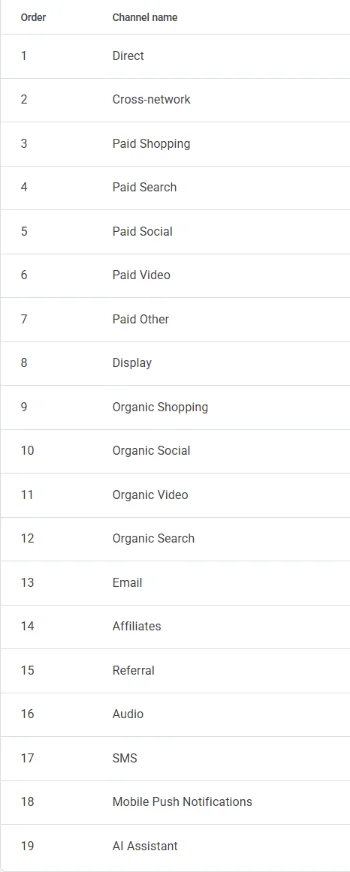
AI Assistant sits below Referral in that list. That’s fine in the built-in group: GA4 gives these visits the ai-assistant medium, not referral, so the Referral rule doesn’t claim them first. If you use the default reports, you already have an AI channel. You just need to know which tools it covers.
How to check where Perplexity and Claude land in your property
- Open Reports → Acquisition → Traffic acquisition.
- Change the primary dimension to Session source / medium.
- Search the table for
perplexity, thenclaude. - If the medium reads
ai-assistant, those visits are in the AI Assistant channel. If it readsreferral, they’re in Referral, and the custom channel group below will catch them.
No AI Assistant row at all? GA4 only shows a channel once it has visits for that date range, so a small site may have none yet. Earning them is the job of answer engine optimization (AEO).
Quick check: find AI visits in the Traffic acquisition report
This takes two minutes and works on any date range, including months before the AI Assistant channel existed.
- Go to Reports → Acquisition → Traffic acquisition and look for the AI Assistant row. That’s Google’s count.
- To catch tools outside Google’s list, change the primary dimension to Session source.
- Click Add filter, pick Session source, and set the match type to matches partial regex:
chatgpt\.com|chat\.openai\.com|perplexity\.ai|gemini\.google\.com|copilot\.microsoft\.com|copilot\.com|edgeservices\.bing\.com|claude\.ai|meta\.ai|deepseek\.com|grok\.com - Set a date range of at least 90 days to see the trend.
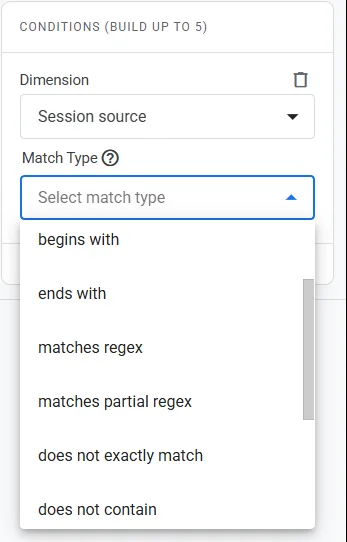
Pick partial. In GA4 a plain regex must match the whole value, so it would miss a source such as www.perplexity.ai. Partial regex is the safe choice for report filters; channel groups need the full-match workaround in the next section.
| Method | Setup | What it catches | Past dates |
|---|---|---|---|
| Built-in AI Assistant channel | None | Sources on Google’s list, which it doesn’t publish in full | Google hasn’t said |
| Report filter (partial regex) | 2 minutes, each time | Any source in your regex | Yes |
| Custom channel group | 10 minutes, once | Google’s list plus your regex | Yes |
Want every AI tool in one row? Build a custom AI channel group
A report filter is a one-off view. A custom channel group makes AI traffic a permanent row you can compare with Organic Search and Referral, in every report that uses the group.
Before you start: standard GA4 properties allow two custom channel groups besides the default (360 properties allow five). Build the AI group as a copy and check it in reports for a week before making it your primary channel group, because the primary group changes what every report shows.
- Go to Admin → Data display → Channel groups and click Create new channel group. It starts as a copy of the default.
- Click Add new channel and name it AI assistants. Add two conditions in the same “match at least one” group:
- Medium exactly matches
ai-assistant(Google’s own list) - Source matches regex, wrapped in
.*( … ).*because channel conditions match the whole value:.*(chatgpt\.com|chat\.openai\.com|perplexity\.ai|gemini\.google\.com|copilot\.microsoft\.com|copilot\.com|edgeservices\.bing\.com|claude\.ai|meta\.ai|deepseek\.com|grok\.com).*
- Medium exactly matches
- Click Reorder and move AI assistants above Referral. GA4 puts each visit in the first channel it matches, so a Perplexity visit with a
referralmedium would otherwise stop at Referral. - Save the group, then pick it from the dimension menu in Traffic acquisition.
Google says custom channel groups apply to reports retroactively, so the new row covers past dates too. Some guides say the opposite; Google’s custom channel groups help page is the one to trust. Edits only affect audiences from the day you make them.
Managing client properties? Use the same regex in each one, so the numbers stay comparable. One custom group gives you a single AI row that you control, instead of a list Google can change without notice.
Why does ChatGPT traffic in Google Analytics show up as Direct?
Because GA4 can only sort a visit it can trace. If the browser passes no referrer and the link carries no UTM tag, GA4 has nothing to go on and files the visit as Direct. In-app browsers and links copied out of a chat are the usual causes.
- Referrer on Google’s AI list→ AI Assistant channel
- Other referrer or a UTM tag→ Referral, or your custom channel
- No referrer and no tag→ Direct
ChatGPT adds utm_source=chatgpt.com to many links, so those visits stay traceable without a referrer. When the tag goes missing, the numbers move. Around 9 October 2026, Cedric Huesler of Adobe saw ChatGPT visits fall as Direct rose. On 15 October he called it a bug and said the tags were back, as Search Engine Roundtable reported.
“Why is my ChatGPT traffic so low?” comes up again and again in analytics forums, and this gap is usually the answer.
It explains sudden jumps too. SE Ranking’s data from 101,574 sites shows ChatGPT’s share of referral traffic rising from 0.23% in April 2026 to 0.32% in May 2026. The study lists a change to ChatGPT’s link format among the possible causes.
Treat every AI number in GA4 as a floor, not a total. When a line moves sharply overnight, check for a tracking change before you credit or blame your content.
What GA4 can’t show you about AI search
- Google AI Overviews and AI Mode. Clicks from them count as Organic Search. Google says they’re included in Search Console’s Performance report under the Web search type, with no separate filter. If you use Ranklance, its Search Console setup guide walks through the connection.
- Answers without clicks. If an assistant answers fully, nobody clicks, and GA4 never hears about it. Share of Model measures that side: how often AI answers name you at all.
- Crawler visits. GA4 counts people, not bots. GPTBot or PerplexityBot fetching your pages won’t show up here; see Block AI crawlers on WordPress for which ones to allow.
GA4 shows the clicks AI search sends you, not how often AI search mentions you. You need both views to see the whole picture.
What to do with your AI traffic numbers
Add Landing page as a secondary dimension. It shows which pages AI assistants send people to, and those pages are already being cited somewhere.
Start with your homepage. SE Ranking found that 60% of AI-referred visits land on homepages, against 17% for organic search. Make sure yours says plainly what you do and where to go next. The pages AI already sends people to are the ones worth improving first.
Then keep those pages current and check how they’re built. Ranklance’s free plugin shows an AEO score for each page in the WordPress editor. It’s Ranklance’s own 100-point rubric, not a Google metric, and it points to what to fix.
AI traffic in GA4: a 6-step setup checklist
- Check Traffic acquisition for an AI Assistant row.
- Check Session source / medium for
perplexityandclaude. - Run the partial-regex filter over the last 90 days.
- Build a custom AI channel group as a copy (mind the two-group limit).
- Add Landing page as a secondary dimension and list your top AI landing pages.
- Write down your regex and today’s date. Recheck it, and Google’s channel definition, every quarter.
FAQ
Does the GA4 AI Assistant channel include Perplexity and Claude?
Google doesn't publish its full list. Its channel definition names ChatGPT, Gemini, Deepseek, Copilot and Grok as examples, and its May 2026 announcement also named Claude. Check Session source / medium in your own property: if the medium is ai-assistant, the visit is in the channel.
Why don't I see Google AI Overviews as a separate source?
Google counts clicks from AI Overviews and AI Mode as normal Google search traffic, so they land in Organic Search. Search Console includes them in the Performance report under the Web search type, with no separate filter.
Does a custom channel group apply to past data?
Yes. Google says custom channel groups can be applied to reports retroactively, so a new AI channel also covers earlier dates. Edits only affect audiences from the date you make them.
Is the AI traffic count in GA4 complete?
No. Visits with no referrer and no UTM tag land in Direct, and answers that nobody clicks never reach GA4 at all. Treat every AI number in GA4 as a floor.
Sources
- Google Analytics Help: Default channel group (AI Assistant definition)
- Google Analytics Help: What’s new (AI Assistant channel, 13 May 2026)
- Google Analytics Help: Custom channel groups
- Google Analytics Help: Regular expressions
- Google Analytics Help: Traffic acquisition report
- Google Search Central: AI features and your website
- Ahrefs: AI chatbot traffic (May 2026)
- SE Ranking: ChatGPT referral traffic, May 2026 (July 2026)
- Search Engine Roundtable: ChatGPT UTM parameters missing (October 2026)
All sources checked 15 October 2026. Spot something wrong? Email support@wisdmlabs.com and we’ll fix it.
Found the pages AI tools send people to? See how ready they are with a free AEO score in the WordPress editor.
Install Ranklance free